Scripts
WFOS
To run the TMT-WFOS exposure-time calculator:
% wfos_etc -h
usage: wfos_etc [-h] [--spec_file SPEC_FILE] [--spec_wave SPEC_WAVE]
                [--spec_wave_units SPEC_WAVE_UNITS] [--spec_flux SPEC_FLUX]
                [--spec_flux_units SPEC_FLUX_UNITS]
                [--spec_res_indx SPEC_RES_INDX | --spec_res_value SPEC_RES_VALUE]
                [--spec_table SPEC_TABLE] [-l EMLINE] [-m MAG]
                [--mag_band MAG_BAND] [--mag_system MAG_SYSTEM]
                [--sky_mag SKY_MAG] [--sky_mag_band SKY_MAG_BAND]
                [--sky_mag_system SKY_MAG_SYSTEM] [-z REDSHIFT]
                [-s SERSIC SERSIC SERSIC SERSIC | -u] [--blue_grat BLUE_GRAT]
                [--blue_wave BLUE_WAVE | --blue_angle BLUE_ANGLE]
                [--blue_binning BLUE_BINNING BLUE_BINNING]
                [--red_grat RED_GRAT]
                [--red_wave RED_WAVE | --red_angle RED_ANGLE]
                [--red_binning RED_BINNING RED_BINNING]
                [--slit SLIT SLIT SLIT SLIT SLIT] [--extract EXTRACT]
                [-t TIME] [-f FWHM] [-a AIRMASS] [-i] [-p]
                [--snr_units SNR_UNITS] [--sky_err SKY_ERR]

WFOS Exposure Time Calculator (v0.1)

optional arguments:
  -h, --help            show this help message and exit
  --spec_file SPEC_FILE
                        A fits or ascii file with the object spectrum to use
                        (default: None)
  --spec_wave SPEC_WAVE
                        Extension or column number with the wavelengths.
                        (default: WAVE)
  --spec_wave_units SPEC_WAVE_UNITS
                        Wavelength units (default: angstrom)
  --spec_flux SPEC_FLUX
                        Extension or column number with the flux. (default:
                        FLUX)
  --spec_flux_units SPEC_FLUX_UNITS
                        Input units of the flux density. Must be interpretable
                        by astropy.units.Unit. Code assumes 1e-17 erg / (cm2 s
                        angstrom) if units are not provided. (default: None)
  --spec_res_indx SPEC_RES_INDX
                        Extension or column number with the flux. (default:
                        None)
  --spec_res_value SPEC_RES_VALUE
                        Single value for the spectral resolution (R =
                        lambda/dlambda) for the full spectrum. (default: None)
  --spec_table SPEC_TABLE
                        Extension in the fits file with the binary table data.
                        (default: None)
  -l EMLINE, --emline EMLINE
                        File with emission lines to add to the spectrum.
                        (default: None)
  -m MAG, --mag MAG     Total apparent magnitude of the source (default: 24.0)
  --mag_band MAG_BAND   Broad-band used for the provided magnitude. Must be u,
                        g, r, i, or z. (default: g)
  --mag_system MAG_SYSTEM
                        Magnitude system. Must be either AB or Vega. (default:
                        AB)
  --sky_mag SKY_MAG     Surface brightness of the sky in mag/arcsec^2 in the
                        defined broadband. If not provided, default dark-sky
                        spectrum is used. (default: None)
  --sky_mag_band SKY_MAG_BAND
                        Broad-band used for the provided sky surface
                        brightness. Must be u, g, r, i, or z. (default: g)
  --sky_mag_system SKY_MAG_SYSTEM
                        Magnitude system. Must be either AB or Vega. (default:
                        AB)
  -z REDSHIFT, --redshift REDSHIFT
                        Redshift of the object, z (default: 0.0)
  -s SERSIC SERSIC SERSIC SERSIC, --sersic SERSIC SERSIC SERSIC SERSIC
                        Use a Sersic profile to describe the object surface-
                        brightness distribution; order must be effective
                        radius, Sersic index, ellipticity (1-b/a), position
                        angle (deg). (default: None)
  -u, --uniform         Instead of a point source or Sersic profile, assume
                        the surface brightness distribution is uniform over
                        the fiber face. If set, the provided magnitude is
                        assumed to be a surface brightness. See the MAG
                        option. (default: False)
  --blue_grat BLUE_GRAT
                        Grating to use in the blue arm. Options are: B1210,
                        B2479, B2700, B3600 (default: B1210)
  --blue_wave BLUE_WAVE
                        Central wavelength for the blue arm. If None, will use
                        the peak-efficiency wavelength. (default: None)
  --blue_angle BLUE_ANGLE
                        Grating angle for blue grating. If None, will use then
                        angle the provides the best efficiency for the on-axis
                        spectrum. (default: None)
  --blue_binning BLUE_BINNING BLUE_BINNING
                        On-chip binning for the blue grating. Order is
                        spectral then spatial. I.e., to bin 2 pixels
                        spectrally and no binning spatial, set --blue_binning
                        2 1 (default: [1, 1])
  --red_grat RED_GRAT   Grating to use in the red arm. Options are: R680,
                        R1392, R1520, R2052 (default: R680)
  --red_wave RED_WAVE   Central wavelength for the red arm. If None, will use
                        the peak-efficiency wavelength. (default: None)
  --red_angle RED_ANGLE
                        Grating angle for red grating. If None, will use then
                        angle the provides the best efficiency for the on-axis
                        spectrum. (default: None)
  --red_binning RED_BINNING RED_BINNING
                        On-chip binning for the red grating. Order is spectral
                        then spatial. I.e., to bin 2 pixels spectrally and no
                        binning spatial, set --red_binning 2 1 (default: [1,
                        1])
  --slit SLIT SLIT SLIT SLIT SLIT
                        Slit properties: x field center, y field center,
                        width, length, rotation. The rotation is in degrees,
                        everything else is in on-sky arcsec. The slit width is
                        in the *unrotated* frame, meaning the effective slit
                        width for a rotated slit is slit_width/cos(rotation).
                        For the field center, x is along the dispersion
                        direction with a valid range of +/- 90 arcsec, and y
                        is in the cross-dispersion direction with a valid
                        range of +/- 249 arcsec. Coordinate (0,0) is on axis.
                        (default: [0.0, 0.0, 0.75, 5.0, 0.0])
  --extract EXTRACT     Extraction aperture in arcsec *along the slit*
                        centered on the source. At the detector, the
                        extraction aperture is narrower by cos(slit rotation).
                        If not provided, set to the FWHM of the seeing disk;
                        see --fwhm (default: None)
  -t TIME, --time TIME  Exposure time (s) (default: 3600.0)
  -f FWHM, --fwhm FWHM  On-sky PSF FWHM (arcsec) (default: 0.65)
  -a AIRMASS, --airmass AIRMASS
                        Airmass (default: 1.0)
  -i, --ipython         After completing the setup, embed in an IPython
                        session. (default: False)
  -p, --plot            Provide a plot of the components of the calculation.
                        (default: False)
  --snr_units SNR_UNITS
                        The units for the S/N. Options are pixel, angstrom,
                        resolution. (default: pixel)
  --sky_err SKY_ERR     The fraction of the Poisson error in the sky incurred
                        when subtracting the sky from the observation. Set to
                        0 for a sky subtraction that adds no error to the sky-
                        subtracted spectrum; set to 1 for a sky-subtraction
                        error that is the same as the Poisson error in the sky
                        spectrum acquired during the observation. (default:
                        0.1)
Source spectrum
The possible source spectra are:
A featureless spectrum with a constant AB magnitude: This is the default spectrum, and the magnitude is set by the
-mcommand-line options.A spectrum read from a file: You can provide a spectrum directly using either a fits or columnated ascii text file. See the
--spec_*command-line options. To check that the spectrum will be read correctly, seeenyo.etc.spectrum.Spectrum.from_ascii()orenyo.etc.spectrum.Spectrum.from_fits(). E.g.:from enyo.etc.spectrum import Spectrum spec = Spectrum.from_ascii('spec.db.gz', wavecol=0, waveunits='nm', fluxcol=1, fluxunits = 'erg/s/cm2/angstrom', resolution=3e5, use_sampling_assessments=True) spec.plot(show=True)Emission-line spectrum. This functionality is currently in development.
Note that the code always rescales the spectrum to the provided
magnitude, which defaults to an AB mag of 24 in the g band. To
rescale to a different magnitude, in a different band or in a
different magnitude system (AB or Vega) use the --mag*
command-line arguments. You can also redshift the provided spectrum
using the -z command-line option, but this hasn’t been well
tested.
Sky Spectrum
The sky spectrum defaults to
enyo.etc.spectrum.MaunakeaSkySpectrum, which is an empirical
dark night-sky spectrum provided by Chuck Steidel.
Warning
Efforts are ongoing to improve the inclusion of the sky spectrum.
- The current script does not change the resolution of the sky spectrum!
- The sky flux between 0.31-0.32 \(\mu{\rm m}\) is just a constant added to match the level of the continuum between 0.321-0.4 \(\mu{\rm m}\).
You can adjust the magnitude of the sky spectrum using the
--sky_mag* command-line options; however, this is a simple
scaling of the dark-sky spectrum and will not be a true
representation of the sky spectrum under brighter moon conditions.
Source Surface-Brightness Distribution
The source can be:
- An unresolved point source (default)
- A source that fills the focal-plane aperture with a constant surface brightness; see
--uniform.- Follow a Sersic profile; see
--sersic. This should be provided with the expected intrinsic parameters (i.e., before convolution with the seeing).
The source profile is convolved with a Gaussian seeing distribution
with a full-width at half maximum (FWHM) set by the --fwhm
argument.
Note that when the source is selected to be a uniform surface brightness within the focal-plane aperture, the provided magnitude of the source is taken to be the surface brightness. In the other distribution cases (point, Sersic), the magnitude is taken to be the total magnitude.
Instrument Setup
The WFOS instrument settings for its blue and red arms are set by the
--blue_* and --red_* command-line options. The default
gratings are for the low-resolution mode. If the grating angle or
central wavelength are not provided, they are set to maximize grating
efficiency. The available gratings for the blue arm and some useful
properties for a 1 arcsec slit are:
| Name | Peak \(\lambda\) (angstrom) | Grating Angle (deg) | \(\Delta\lambda\) (angstrom) | Resolution \(\lambda/\Delta\lambda\) |
|---|---|---|---|---|
| B1210 | 3933.3 | 13.8 | 3.9 | 1011 |
| B2479 | 4076.0 | 30.3 | 1.7 | 2415 |
| B2700 | 4944.3 | 41.9 | 1.3 | 3697 |
| B3600 | 3735.6 | 42.3 | 1.0 | 3747 |
The available gratings for the red arm and some useful properties for a 1 arcsec slit are:
| Name | Peak \(\lambda\) (angstrom) | Grating Angle (deg) | \(\Delta\lambda\) (angstrom) | Resolution \(\lambda/\Delta\lambda\) |
|---|---|---|---|---|
| R680 | 7352.4 | 14.5 | 6.9 | 1065 |
| R1392 | 7200.4 | 30.1 | 3.0 | 2389 |
| R1520 | 8839.6 | 42.2 | 2.4 | 3741 |
| R2052 | 6569.6 | 42.4 | 1.7 | 3764 |
The quantities in these tables (and for other grating settings) can
be generated as follows (see SlitSpectrographArm):
from enyo.etc.spectrographs import WFOSGrating, TMTWFOSBlue, TMTWFOSRed

blue_gratings = [g for g in WFOSGrating.available_gratings.keys() if 'B' in g]
for grating in blue_gratings:
    arm = TMTWFOSBlue(grating=grating)
    print('{0:>5} {1:5.1f} {2:4.1f} {3:5.1f} {4:5.0f}'.format(
            grating, arm.cen_wave, arm.grating_angle,
            arm.resolution_element(slit_width=1., units='angstrom', wave=arm.cen_wave),
            arm.resolution(arm.cen_wave, slit_width=1.)))

red_gratings = [g for g in WFOSGrating.available_gratings.keys() if 'R' in g]
for grating in red_gratings:
    arm = TMTWFOSRed(grating=grating)
    print('{0:>5} {1:5.1f} {2:4.1f} {3:5.1f} {4:5.0f}'.format(
            grating, arm.cen_wave, arm.grating_angle,
            arm.resolution_element(slit_width=1., units='angstrom', wave=arm.cen_wave),
            arm.resolution(arm.cen_wave, slit_width=1.)))
The number of pixels per resolution element for a 1 arcsec slit is 19.4, e.g.:
from enyo.etc.spectrographs import TMTWFOSBlue
print(TMTWFOSBlue().resolution_element(slit_width=1., units='pixels'))
You can change the detector binning using the --*_binning
command-line arguments.
Slit Properties
To set the slit position and shape, use the --slit command-line
option. The field position leads to some changes in the available
spectral range — driven by the “y” (cross-dispersed) position —
and efficiency — driven by the change in grating incidence angle.
For different slit widths, you can appropriately scale \(\Delta\lambda\) and \(R\) to get the expected performance. For example, the spectral resolution for a 0.75 arcsec slit for the B1210 setup shown above is 1011/0.75 = 1348. In the same way, the slit width also changes the number of detector pixels per resolution element (19.4*0.75 = 14.5 pixels for a 0.75 arcsec slit), which may affect your binning choice.
You can change the rotation of the slit relative to the dispersion axis, but beware of follow-on changes to the S/N calculation. Specifically, this changes the effective slit width along the dispersion direction by \(1/\cos({\rm rotation}\). Given the definition of the extraction aperture as always along the slit, this also changes the number of pixels in the extraction.
Source Extraction
The ETC uses a nominal box extraction for the S/N calculation. This
primarily used to calculate the aperture loss and the number of pixel
read-noise hits to include. By default the extraction aperture is set
to the seeing FWHM. To change the extraction width, use the
--extract command-line argument; note that the extraction width
is always along the slit length, centered on the object.
Observing Specifications
You can change the exposure time (--time), airmass
(--airmass), and seeing (--fwhm) conditions for the
observation; defaults are 1 hr, 1.0, and 0.65 arcsec, respectively.
S/N calculation
The main output of the ETC is a plot of the S/N as a function of wavelength. An example looks like this:
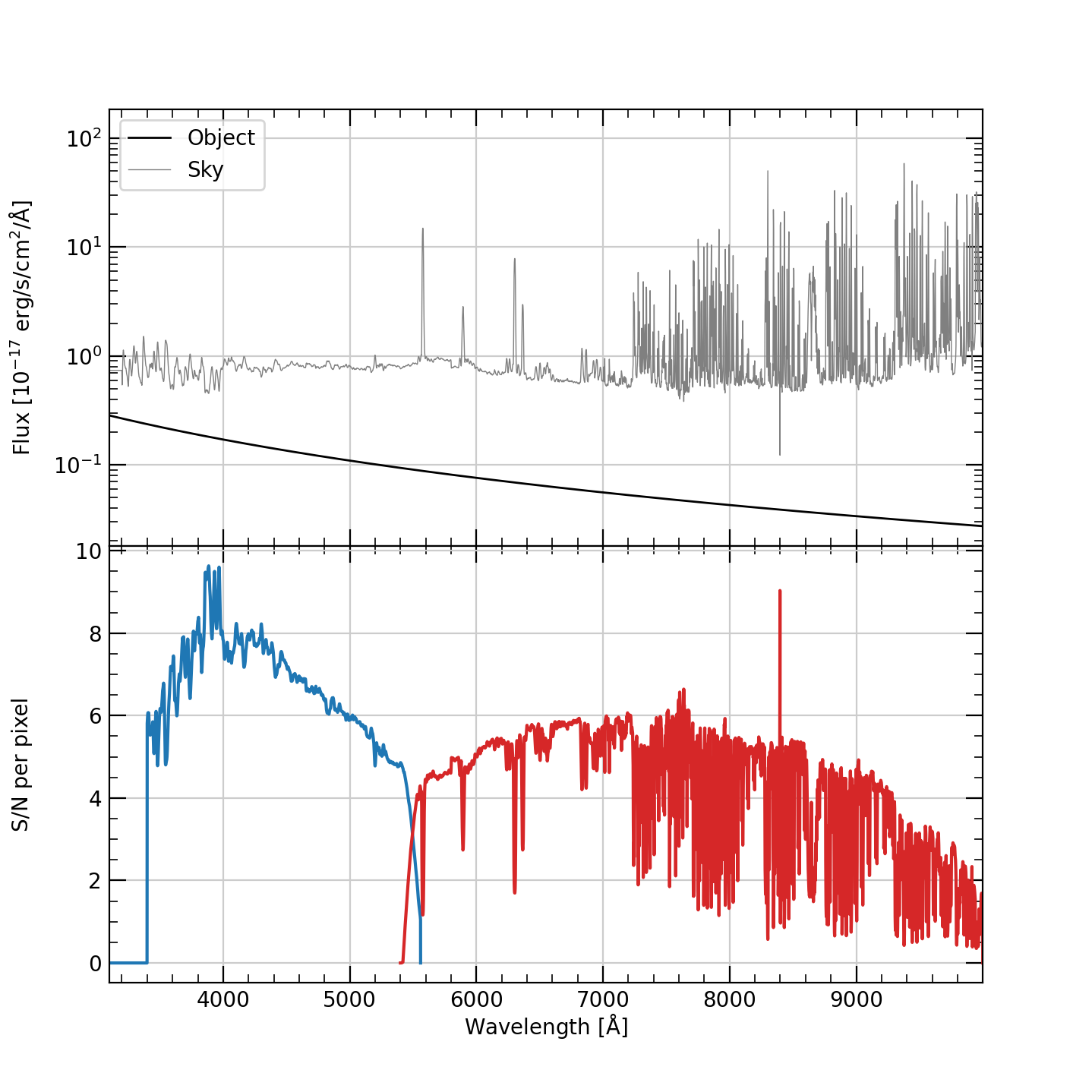
Output from simply executing wfos_etc with no command-line
arguments. The object and sky spectra are shown in the top panel.
The S/N per pixel is shown in the bottom panel for the blue arm in
blue and the red arm in red.
You can change the error incurred from the sky subtraction
(--sky_err) and the units for the S/N vector (--snr_units).
To turn the plot off, set --plot. To drop into an ipython session
at the end of the script, use --ipython.